mirror of
https://github.com/NoCLin/LightMirrors
synced 2025-12-16 22:20:30 +08:00

139 lines
4.7 KiB
Markdown
139 lines
4.7 KiB
Markdown
中文 | [English](README.en.md)
|
||
|
||
|
||
<div align="center">
|
||
|
||
# LightMirrors
|
||
|
||
<a href='https://github.com/NoCLin/LightMirrors/'><img src='https://img.shields.io/badge/Light-Mirrors-green'></a>
|
||
<a href='https://github.com/homeinfra-org/infra'><img src='https://img.shields.io/static/v1?label=Home&message=Infra&color=orange'></a>
|
||
[](https://github.com/NoCLin/LightMirrors)
|
||
[](https://github.com/NoCLin/LightMirrors)
|
||
|
||
|
||
LightMirrors是一个开源的缓存镜像站服务,用于加速软件包下载和镜像拉取。
|
||
目前支持**DockerHub**、PyPI、PyTorch、NPM等镜像缓存服务。 当前项目仍处于早期阶段。
|
||
|
||
欢迎提交Pull Request和Issue,我们非常期待您的宝贵建议和意见。
|
||
|
||

|
||
|
||
</div>
|
||
|
||
|
||
---
|
||
|
||
## Motivation
|
||
|
||
由于国内访问国外软件源的速度较慢,特别是DockerHub缺少国内镜像站,
|
||
因此我们在本地部署镜像站来加速网络访问和节省外网带宽。
|
||
|
||
## Quick Start
|
||
|
||
### Prerequisites
|
||
|
||
- docker + docker-compose.
|
||
- 一个域名,设置 `*.yourdomain` 的A记录指向您服务器的IP.
|
||
- `*.local.homeinfra.org` 默认指向 `127.0.0.1`,本地测试可以直接使用。
|
||
- 代理服务器(如有必要).
|
||
|
||
> 如果需要使用HTTPS,可以在外层新增一个HTTP网关(如Caddy),请参考后续章节。
|
||
|
||
执行以下命令以启动LightMirrors:
|
||
|
||
```bash
|
||
|
||
cp .env.example .env
|
||
docker-compose up
|
||
|
||
```
|
||
|
||
并尝试通过控制台输出的地址进行访问,http://aria2.local.homeinfra.org/aria2/index.html
|
||
为aria2的管理界面,用于查看下载状态`。
|
||
|
||
可以使用以下命令进行测试镜像站是否正常工作:
|
||
|
||
```bash
|
||
docker pull docker.local.homeinfra.org/alpine
|
||
pip3 download -i http://pypi.local.homeinfra.org/simple/ jinja2 --trusted-host pypi.local.homeinfra.org
|
||
pip3 download -i http://torch.local.homeinfra.org/whl/ torch --trusted-host torch.local.homeinfra.org
|
||
```
|
||
|
||
### Deployment
|
||
|
||
修改 `.env` 文件,设置下列参数:
|
||
|
||
- `BASE_DOMAIN`: 基础域名,如 `local.homeinfra.org`,可以通过 `*.local.homeinfra.org` 访问镜像站。
|
||
- `RPC_SECRET`:Aria2的RPC密钥。
|
||
- `all_proxy`:代理服务器地址,如有必要。
|
||
- `SCHEME`:`http` 或 `https`。
|
||
|
||
配置完成之后,执行以下命令:
|
||
|
||
```bash
|
||
docker-compose up
|
||
```
|
||
|
||
#### HTTPS
|
||
|
||
在 .env 中配置 `SCHEME=https` 与 CLOUDFLARE_DNS_API_TOKEN。
|
||
本项目提供了一个基于Cloudflare DNS的 `Caddyfile` 和 `Dockerfile`。如果您希望使用其他DNS Provider或者LB,请自行修改。
|
||
|
||
配置完成后,使用以下命令代替上述的`docker-compose up` (多了 `-f docker-compose-caddy.yml`) :
|
||
|
||
```bash
|
||
docker-compose -f docker-compose-caddy.yml up
|
||
```
|
||
|
||
## Design
|
||
|
||
LightMirrors依赖于两个组件:
|
||
|
||
- aria2 : 下载器与管理UI。
|
||
- mirrors: 镜像HTTP服务器,根据不同域名转发请求到不同模块。
|
||
- Aria2Ng
|
||
- PyPI
|
||
- DockerHub
|
||
- ...
|
||
|
||
## Mirror Sites
|
||
|
||
> 假设我们的域名为 local.homeinfra.org,并且开启了了https,如果您使用的是http,请自行替换。
|
||
|
||
### DockerHub
|
||
|
||
docker pull 的时候添加前缀 `docker.local.homeinfra.org` 即可。
|
||
|
||
> 请注意:当 `SCHEME=http` 且 `DOCKER_BUILDKIT=1` 时,
|
||
> Dockerfile 中的 `FROM docker.local.homeinfra.org/xxx` 语法默认将从 https 站点拉取镜像,
|
||
> 此时将会出现错误。请使用 `docker pull`代替,或者尝试设置环境变量 `DOCKER_BUILDKIT=0`
|
||
|
||
### PyPI
|
||
|
||
- https: `pip install jinja2 --index-url https://pypi.local.homeinfra.org/simple/`
|
||
- http: `pip install jinja2 --index-url http://pypi.local.homeinfra.org/simple/ --trusted-host pypi.local.homeinfra.org`
|
||
|
||
### PyTorch
|
||
|
||
- https: `pip install torch --index-url https://torch.local.homeinfra.org/whl/`
|
||
- http: `pip install torch --index-url http://torch.local.homeinfra.org/whl/ --trusted-host torch.local.homeinfra.org`
|
||
|
||
把`download.pytorch.org`替换为 `torch.local.homeinfra.org` ,
|
||
如果使用的是http,还需添加 `--trusted-host torch.local.homeinfra.org`。
|
||
|
||
> 可以根据不同的硬件类型,切换不同的索引,如 https://download.pytorch.org/whl/cpu ,其中 `cpu`
|
||
> 可以替换为cu116/cu118/cu121/rocm5.4.2 等等。
|
||
> 具体请参考:https://pytorch.org/get-started/previous-versions/
|
||
|
||
### NPM
|
||
|
||
npm 命令后加上 `--registry https://npm.local.homeinfra.org` 即可。
|
||
|
||
- https: `npm install -S express --registry https://npm.local.homeinfra.org`
|
||
- http: `npm install -S express --registry http://npm.local.homeinfra.org`
|
||
|
||
## Star History
|
||
|
||
[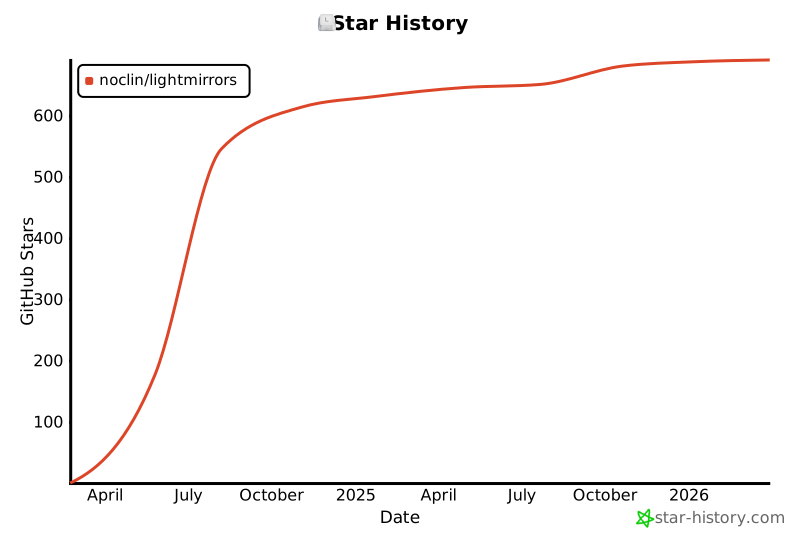](https://star-history.com/#NoCLin/LightMirrors&Date)
|
||
|